Archive Asana before deleting a workspace or cancelling
Make your archive before you downgrade, cancel or delete. Here is what Asana says happens to your data, a checklist to follow, and how to get a readable copy of every task.
If you are about to delete, downgrade or cancel an Asana workspace or organization, make your archive first and change the plan last. Asana's help center says cancelling or downgrading does not delete your data, but you lose access to paid features. Deleting content is a different story: deleted items can be recovered for only 30 days. An archive made beforehand gives you a copy you control. It is a record you can read and share, not a backup you can load back into Asana.
What Asana says happens to your data
Asana treats downgrading, cancelling and deleting differently, so it helps to know which one you are about to do.
Downgrading or cancelling a paid plan
- Asana's help center says a downgrade takes effect at the end of your current subscription period.
- According to Asana's cancellation article, your data is not deleted when you downgrade, but you lose access to paid features such as rules, goals and portfolios. Asana notes that you can still export those tasks and projects to a CSV file.
- The free Personal plan has a lower member limit than paid plans, and Asana says you may be prompted to remove users when you downgrade.
Deleting a workspace or organization
- Asana's help center does not describe a single "delete workspace" button. It describes deactivating a workspace by removing all tasks, projects and other members, and then leaving it. Leaving does not delete the projects and tasks in it.
- For organizations, Asana warns that if you leave an organization empty, a new person who signs up with that company email address can be added to it automatically.
- When someone is removed from an organization, Asana says the tasks, projects, messages, files and comments they created stay, but tasks assigned to them become unassigned.
- Deactivating your own Asana account does not deactivate the organization. You simply lose access to its content.
- Deleted tasks, projects and messages stay in Asana's Deleted view for 30 days. After that, or if an item is permanently deleted, Asana says it cannot be recovered.
If you need a workspace or organization fully removed, contact Asana support and ask them to confirm what will be deleted and when.
Pre-deletion checklist
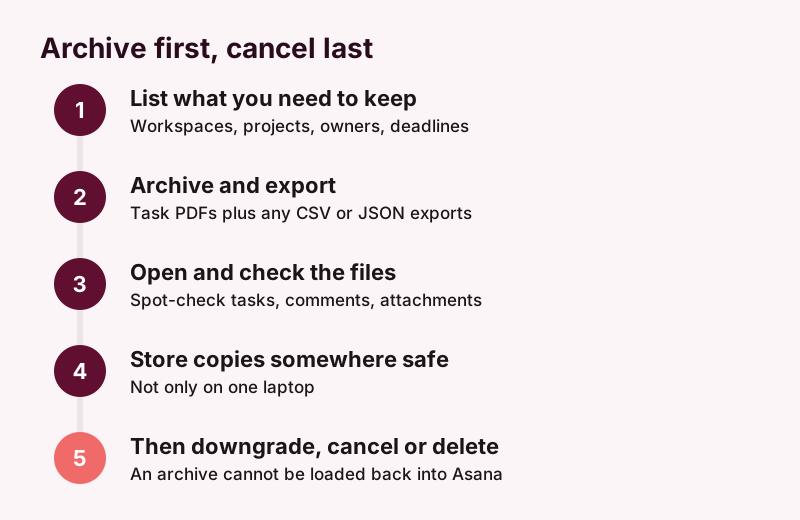
- Decide what must survive. List the workspaces and projects you need, who owns them, and why you are keeping them (client handover, audits, your own reference). For records you keep for legal or regulatory reasons, check retention requirements with your legal or compliance team.
- Note your deadline. A downgrade takes effect at the end of the billing period, so plan to archive while paid features are still available.
- Make a readable archive. A task-by-task PDF archive keeps descriptions, comments and attachments together in a form anyone can open. See how to export Asana tasks to PDF.
- Add Asana's own exports if useful. Asana's help center describes exporting a project to CSV or JSON from the project's menu. Asana's developer documentation describes a full organization export through the API, available only to service accounts on Enterprise+ organizations.
- Open the files and check them. Spot-check a few important tasks, including comments and attachments, before you change anything in Asana.
- Store copies safely. Keep the archive in more than one place, not only on one laptop that might be returned or wiped.
- Reassign or remove members last. Removing people leaves their tasks unassigned, so archive first while assignees are still shown.
- Then downgrade, cancel or delete.
For a longer view of backup methods, read how to back up Asana.
One-off archive or a Solo/Team trial?
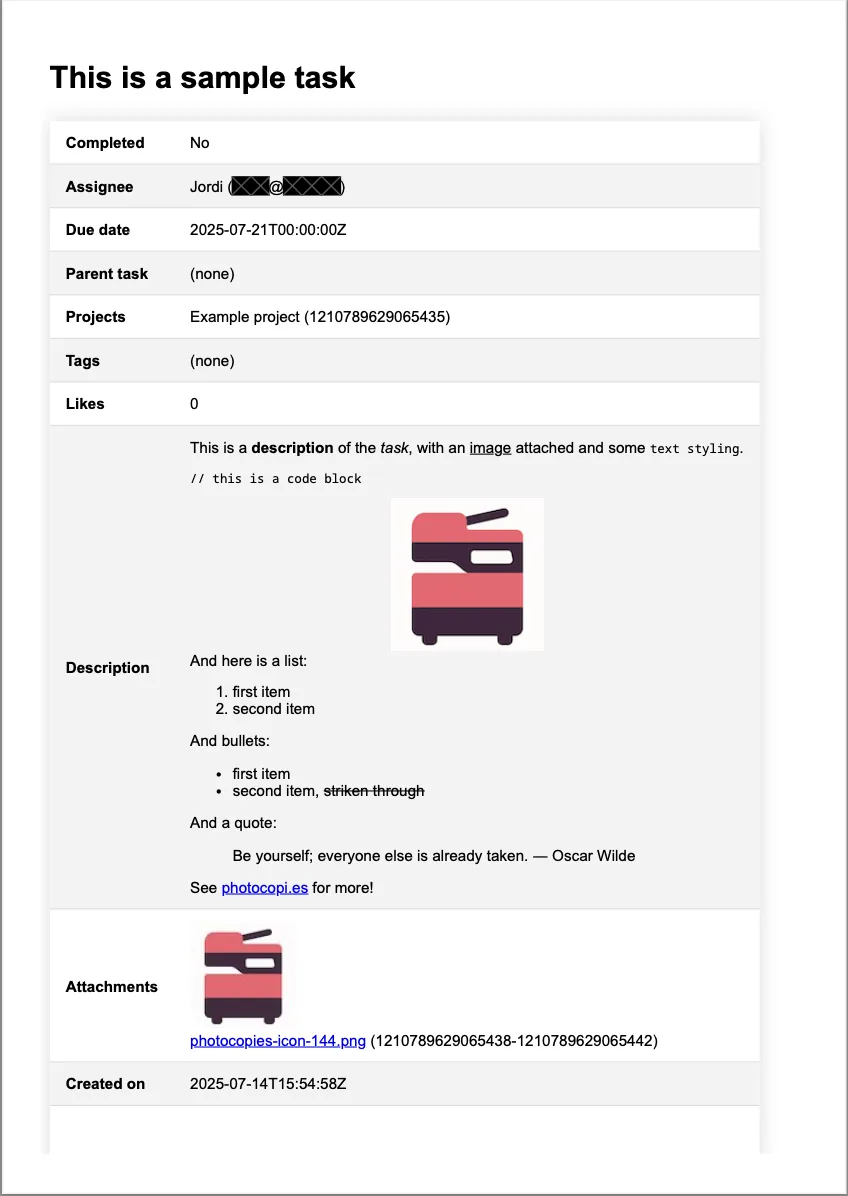
photocopi.es connects to Asana with "Sign in with Asana", and you pick one workspace to archive. It exports each task to its own PDF with the title, rich description, comments and activity, a list of attachments with image thumbnails, and task details such as assignee, due date, completed status, projects, tags, followers and custom fields. Attachments that Asana can download are saved as separate files. You can open an example task PDF to see the format.
There are two ways to get that archive before you cancel:
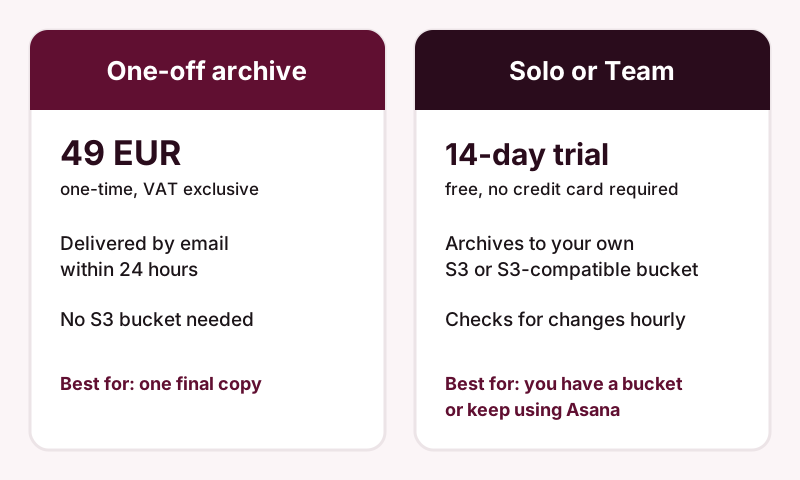
| One-off archive | Solo or Team plan | |
|---|---|---|
| Price (VAT exclusive) | 49 EUR per archive, one-time | Solo: 5 EUR/month billed annually. Team: 2 EUR/user/month billed annually, 10-user minimum |
| Trial | None | 14-day free trial, no credit card required |
| Delivery | By email within 24 hours | Written to your own Amazon S3 or S3-compatible bucket |
| S3 bucket needed | No | Yes |
| Updates | A single snapshot | First sync archives everything, then checks for changes every hour |
Choose the One-off archive if you are leaving Asana, have no S3 bucket, and want one final copy. Order it at least a day before your access ends, since delivery can take up to 24 hours.
Choose a Solo or Team trial if you already have an S3 or S3-compatible bucket, or you are downgrading but still using Asana and want ongoing archiving. The files go to your own bucket, not to photocopi.es servers, and how long they are kept is up to your bucket settings. See backing up Asana to S3 for setup. Prices and plan details are on the pricing section.
What an archive cannot do
- It cannot be restored into Asana. photocopi.es does not put data back into Asana. If you think you might return, keep your Asana data too, for example by downgrading instead of deleting.
- It archives tasks, not everything. Project lists, board views, calendars and messages (conversations and status updates) are not archived.
- Some attachments are recorded by name only. Files without a download link, such as files linked from external services, are listed but not saved. Download those from their original service.
Archive your workspace before you cancel
Try Solo or Team free for 14 days with your own S3 bucket, no credit card required. No bucket? Order a One-off archive instead.
Start your 14-day free trialSources
- Cancel your Asana plan: how it works, Asana Help Center, checked 11 October 2026.
- Modify your Asana plan: upgrade or downgrade, Asana Help Center, checked 11 October 2026.
- Asana Pricing (FAQ), Asana, checked 11 October 2026.
- Manage Asana workspaces: settings & members, Asana Help Center, checked 11 October 2026.
- Asana workspaces & organizations FAQ, Asana Help Center, checked 11 October 2026.
- Asana accounts: manage your login & settings, Asana Help Center, checked 11 October 2026.
- Recover deleted tasks, projects & more in Asana, Asana Help Center, checked 11 October 2026.
- How to import & export projects in Asana, Asana Help Center, checked 11 October 2026.
- Organization exports, Asana Developers, checked 11 October 2026.
- photocopi.es pricing and FAQ, photocopi.es, checked 11 October 2026.