Save your Asana work before school or volunteer access ends
Class projects, student plans and volunteer roles end. Here is how to keep a copy of your Asana tasks, comments and files before you lose access.
If your Asana access comes from a school, a class project, a student program or a volunteer organization, it can end on a date you do not control. The safe move is to save a copy of the work you want to keep while you can still sign in: decide what matters, export or archive it outside Asana, and open the copy to check it before your last day. This guide covers what may change when access ends, what is worth saving, and a few low-effort ways to do it.
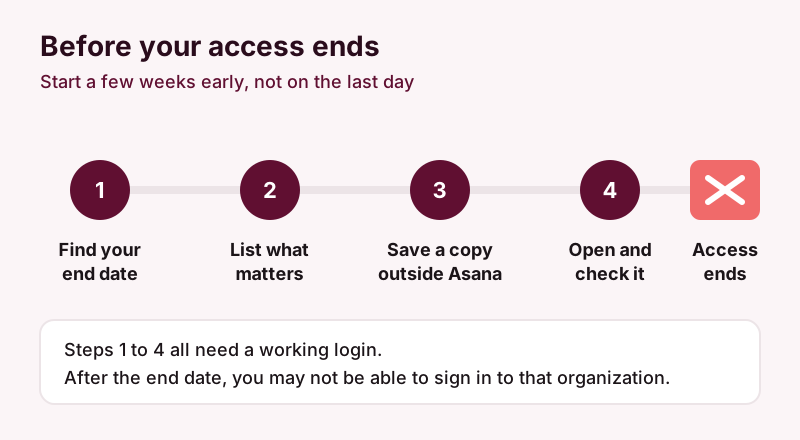
What may happen when your access ends
There is no single "access ends" event in Asana. What happens depends on how you got in and who manages the account. These are the common situations for students and volunteers.
A student or nonprofit discount runs out
Asana runs a program for students. Its students page describes a discount for eligible students enrolled at qualifying academic institutions, verified by a partner (Goodstack), that lasts 12 months on the Starter plan. According to that page, the plan then renews at Asana's regular pricing. Asana also runs a separate discount program for eligible nonprofits, again with eligibility checked through Goodstack, and points schools and universities to an education program. The exact terms differ by program and change over time, so read the current pages before you plan around them.
If a paid plan is cancelled or downgraded instead of renewed, Asana's help center says cancellation takes effect at the end of the billing period, and that paid features stop being available after a downgrade while the underlying data stays. In other words, losing a discount is usually a billing decision, not an instant deletion, but features you relied on may stop working.
You are removed from the school's or organization's Asana
This is the case that catches most people. When you graduate, a course ends or a volunteer role finishes, an admin may remove you from the organization. Asana's FAQ says removal takes away access to the organization and its projects and tasks. The work you created stays in the organization, and tasks assigned to you become unassigned. The organization keeps the history; you do not keep access to it.
Asana's FAQ also notes that removing someone from an organization removes that organization's email address from their Asana account, and that a person with no other email address on their account may be locked out of Asana. If you signed up with a school or nonprofit email address, check your account settings for a personal email address before your access ends.
You were a guest
Volunteers and outside collaborators are often added as guests. Asana describes guests as only able to access what is explicitly shared with them, so your view of a project may already be narrower than a member's, and it can shrink further when sharing changes.
What to save
Keep the work that proves what you did or that you will need again. For most students and volunteers, that means:
- Deliverables and decisions: task descriptions, final versions, and the comments where choices were made.
- Files: attachments you uploaded or received, such as reports, drafts, images and spreadsheets.
- Who did what: assignees, due dates and completion status, useful for a portfolio, a reference letter or a handover to the next volunteer.
- Structure: how projects were organized, if you want to reuse the setup elsewhere.
Before you save anything, check whether your school or organization has rules about copying its data, especially if tasks contain personal information about other students, donors or the people a nonprofit serves. Ask the admin or coordinator if you are not sure; they may also prefer to keep an archive themselves.
Low-effort ways to keep a copy
Asana's built-in project export
Asana's help center describes exporting a project to CSV or JSON from the menu next to the project title, and the same menu offers printing. A CSV is a spreadsheet-friendly list of tasks and their fields, and JSON is mostly useful if you are comfortable with data files. This is free with your existing access and quick for one or two projects. Open the file afterwards and check that it includes what you care about, such as comments and attachments, before you rely on it.
Screenshots and downloads for the things that matter most
For a handful of tasks, downloading the key attachments and printing or screenshotting a board can be enough. It is manual, but it costs nothing and works for small class projects.
A one-off PDF archive from photocopi.es
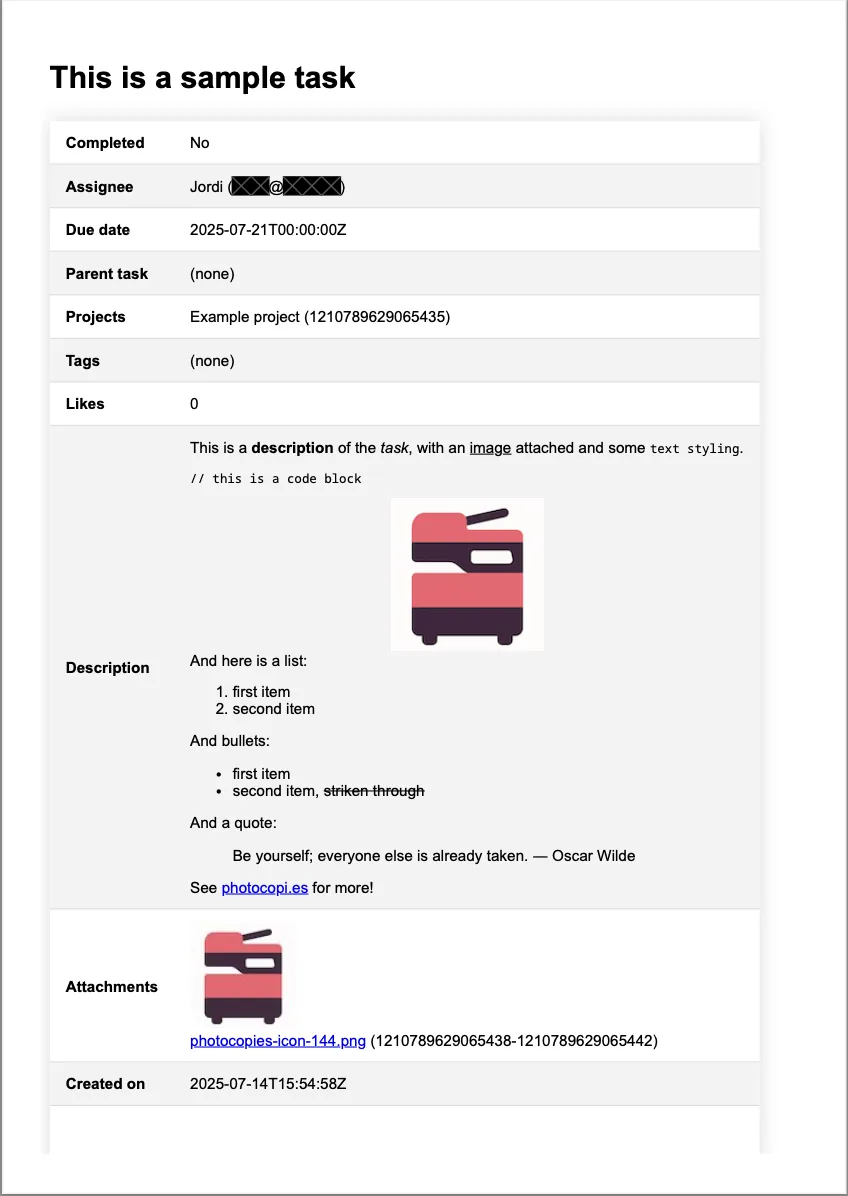
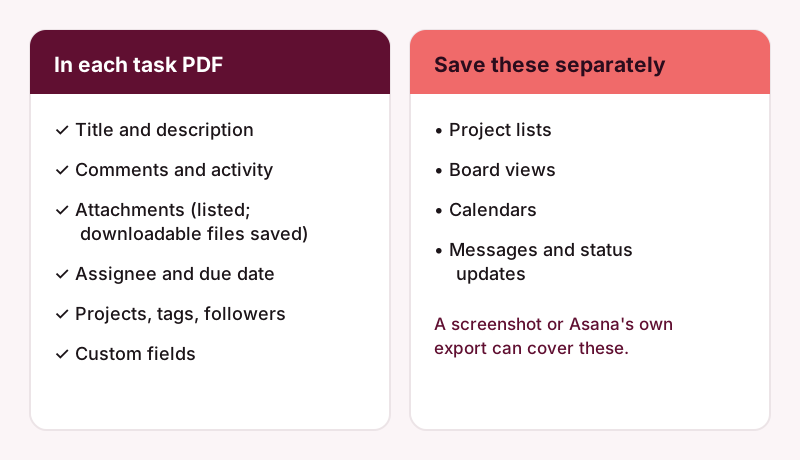
If you have more than a few tasks, or you want the conversations and files kept together in a form anyone can open, a one-off archive saves you the manual work. photocopi.es exports each task to its own PDF. Each PDF contains the task title, the formatted description, comments and activity, a list of attachments with image thumbnails, and task details such as assignee, due date, completion status, projects, tags, followers and custom fields. Attachments that Asana can download are saved as separate files next to the PDF. You can open an example task PDF to see the format.
The One-off archive costs 49 EUR per archive (VAT exclusive), paid once. It is delivered by email within 24 hours and does not need an Amazon S3 bucket. Order it while your account still has access to the workspace; see pricing for the current options.
Know the limits
A photocopi.es archive is a read-only record of tasks. It does not include project lists, board views, calendars or messages, and it cannot restore anything back into Asana. If you need those, take a screenshot of the board or use Asana's project export alongside the archive.
If your group keeps working after you leave
Sometimes the work continues: a student society hands over to next year's committee, or a nonprofit keeps the project but volunteers rotate. In that case a one-time snapshot may not be enough for the organization itself. photocopi.es also has continuous plans that archive everything once and then check for changes every hour, saving PDFs to the organization's own Amazon S3 or S3-compatible storage. They are paid plans with a 14-day free trial. How to back up Asana and Ways to back up Asana compared explain the options, and Archive Asana before deleting a workspace or cancelling helps if the whole workspace is closing.
A short checklist
- Find out when your access ends and how: graduation, end of term, end of a discount, or the end of a volunteer role.
- Add a personal email address to your Asana account if you signed up with a school or organization address.
- Ask the admin or coordinator whether you may keep a copy, and of what.
- Pick a method: project export, manual downloads, or a one-off PDF archive.
- Open the copy and check a few tasks before your last day.
Keep your Asana work before you lose access
Order a One-off archive (49 EUR plus VAT, delivered by email within 24 hours, no S3 bucket needed), or try a continuous plan free for 14 days. Compare both on the pricing page.
Start your 14-day free trialSources
- Asana for Students, Asana, checked 11 October 2026.
- Asana for Nonprofits Discount Program, Asana, checked 11 October 2026.
- Cancel your Asana plan: how it works, Asana Help Center, checked 11 October 2026.
- Modify your Asana plan: upgrade or downgrade, Asana Help Center, checked 11 October 2026.
- Frequently asked Asana product questions, Asana, checked 11 October 2026.
- Manage members in your Asana organization, Asana Help Center, checked 11 October 2026.
- Asana permissions: roles, access levels and control, Asana Help Center, checked 11 October 2026.
- How to import and export projects in Asana, Asana Help Center, checked 11 October 2026.