Keeping Asana records for audits and compliance
How to keep a readable, independent record of the decisions and approvals your team makes in Asana, and where retention should be controlled.
If decisions and approvals happen in Asana, the record of who approved what, and when, lives in Asana too. To keep that record for an audit, save each relevant task, with its comments, activity and attachments, in a readable format such as PDF, and store it somewhere your organization controls and sets the retention rules for. This article explains why that matters, what to keep, and where photocopi.es fits in, including what it does not archive.
Why work records matter in an audit
Auditors, regulators and clients rarely ask for a project plan. They ask for evidence: that a change was approved before it went live, that a review happened, that a request was handled by the right person. In many teams that evidence is an Asana task, where the approval is a comment, a completed task or a custom field value, with a date in the activity history.
That evidence is only useful if you can still produce it later, in a form someone outside your Asana workspace can read. Three things tend to get in the way:
- Deletion. Tasks get deleted, sometimes by accident, and recovery windows are limited.
- Lost access. People leave, workspaces change plans or are closed, and the auditor never had a seat to begin with.
- Format. A spreadsheet export of task names and dates is not the same as the discussion that led to a decision.
What Asana itself offers
Asana's help center describes a Deleted view where deleted tasks, messages and projects are kept for 30 days; after that, or if an item is deleted permanently, it cannot be recovered. Asana also lets you export a project to CSV or JSON, which is useful as data but is not a page you can hand to an auditor.
For larger organizations, Asana offers compliance features on its top plans. Its developer documentation describes an Audit Log API that records important events in an organization, available on Enterprise+ or on Enterprise with the Compliance Management add-on. It says audit log events are kept for 90 days and suggests keeping longer history in your own storage. Asana's help center also describes a data retention policy, on the same plans, that super admins can use to delete inactive data after a period they choose.
These features are about security events and removing old data. They do not, on their own, give you a long-term, human-readable copy of each task and its discussion in storage you own.
What to keep
Start from the questions an auditor is likely to ask, then decide which Asana work answers them. For each record, a useful copy shows:
- What was decided: the task title and description, including any specifications in it.
- Who was involved: the assignee, followers and the people who commented.
- When it happened: created date, due date, completion status and the activity history.
- How it was approved: comments, custom field values (for example a status or approval field) and tags.
- Supporting evidence: attached files such as signed documents, screenshots or reports.
Agree internally which projects count as records, and how long each kind should be kept. Your legal or compliance team should set those periods, not your project tool.
Why a readable format in storage you control helps
A PDF per task can be opened by anyone with a PDF reader, without an Asana account, years after the fact. It can be attached to an audit response, shared with a client, or reviewed offline. Look at an example archived task PDF to judge whether the format fits your needs, or read how to export Asana tasks to PDF for other ways to get one.
Storing those files in a bucket your organization owns also means your organization decides who can read them, where they live and how long they are kept, using the same storage controls your IT team already manages for other records.
Retention is set by your storage, not by photocopi.es
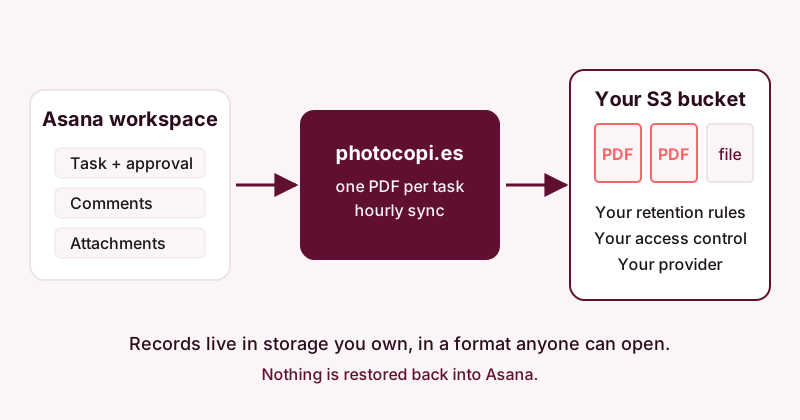
photocopi.es writes archives to your own Amazon S3 bucket or to S3-compatible storage. Archives are not stored on photocopi.es servers, and retention and deletion of the archived files are controlled by your bucket's settings. The retention options available to you are therefore those of your storage provider.
If you use Amazon S3, AWS documents two features that are relevant to record keeping:
- S3 Versioning keeps multiple versions of an object in the same bucket, so an overwritten or deleted file can be recovered from an earlier version.
- S3 Object Lock stores objects using a write-once-read-many (WORM) model, with retention periods and legal holds. AWS describes a governance mode, which users with special permission can override, and a compliance mode, in which a protected object version cannot be overwritten or deleted by any user until its retention period ends. Object Lock works only in buckets with versioning enabled.
These are AWS features that you configure in your own AWS account; photocopi.es does not set them up or manage them. If you use another S3-compatible provider, check its documentation for comparable options. Before turning on a strict setting such as compliance mode, make sure the retention period is one your compliance team has approved, because AWS documents that it cannot be shortened later.
For setup details, see Back up Asana to Amazon S3 or S3-compatible storage.
What photocopi.es archives
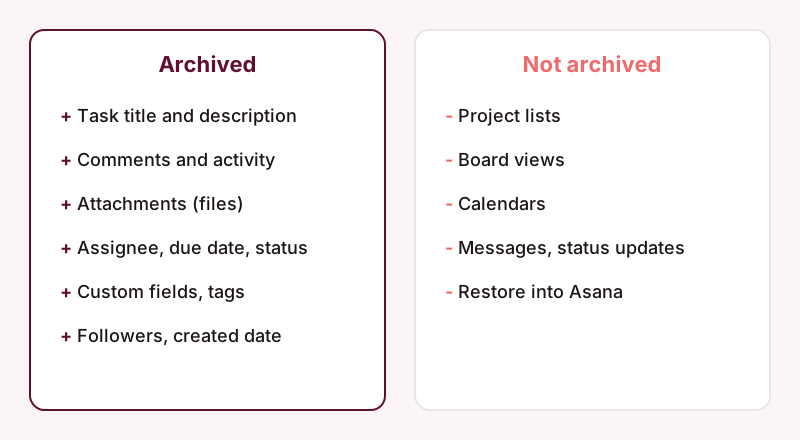
photocopi.es connects to Asana with "Sign in with Asana", and you choose one workspace to back up. It exports each Asana task to its own PDF containing:
- the task title and rich description, including formatting, lists, code blocks and inline images;
- comments and activity;
- a list of file attachments, with image thumbnails;
- task details: assignee, due date, completed status, created date, projects, tags, parent task, followers, custom fields and likes count.
Attachments that Asana can download are saved as separate files next to the PDF. Attachments without a download URL, such as files linked from external services, are recorded by name only. On the Solo and Team plans, the first sync archives everything, then photocopi.es checks for changes every hour, so new comments and approvals reach your bucket without anyone having to remember to export.
What it does not archive
Be clear about the limits before you rely on it for audits:
- It does not archive project lists, board views, calendars or messages (conversations and status updates). If approvals happen in status updates or messages, capture them another way, or record the approval in a task.
- It cannot restore data back into Asana. The archive is a record to read, not something you load back in.
- It does not manage retention or access to the archive. Those are handled by your storage.
If you only need a one-time snapshot, for example before a workspace closes, the one-off archive is delivered by email and needs no S3 bucket. See Archive Asana before deleting a workspace or cancelling and pricing.
Security and privacy notes
Storage credentials you enter are encrypted at rest and in transit. The service is hosted in an ISO 27001-certified data center in the EU, the photocopi.es site states GDPR and CCPA compliance, and no data is sold. These statements describe photocopi.es only; whether your overall setup meets your obligations is a question for your compliance team.
A simple checklist
- Ask your legal or compliance team which Asana work counts as a record and how long to keep it.
- Make sure approvals are recorded in tasks (comments, custom fields, completion) rather than only in messages.
- Create a bucket you control and, if your team wants it, enable your provider's versioning or retention features.
- Connect photocopi.es and let it archive the workspace, then open a few PDFs to confirm they contain what an auditor would need.
- Review who has access to the bucket, as you would for any other records store.
If you need to hand records to someone outside your organization, see Handing over Asana project history to a client or regulator.
Keep your Asana records in your own bucket
photocopi.es archives each Asana task to a PDF in your own S3 or S3-compatible storage and checks for changes every hour. The Solo and Team plans include a 14-day free trial, no credit card required.
Start your 14-day free trialSources
- Recover deleted tasks, projects & more in Asana, Asana Help Center, checked 11 October 2026.
- How to import & export projects in Asana, Asana Help Center, checked 11 October 2026.
- Asana data retention policy, Asana Help Center, checked 11 October 2026.
- Audit log API, Asana Developers, checked 11 October 2026.
- Retaining multiple versions of objects with S3 Versioning, Amazon Web Services, checked 11 October 2026.
- Locking objects with Object Lock, Amazon Web Services, checked 11 October 2026.